
Preface
I built a homepage reminder/recommendation API. The requirement is: if something has already been reminded (recommended) today, it must not be reminded again. Since the volume of reminder content (the order of magnitude won’t exceed the number of a user’s friends) and the data size (basically just a userId) are both very small, I simply put today’s recommendation history into Redis and do version comparisons there. This solution is totally fine, and it has been running in production for a while.
One more bit of context: our online Redis uses a Cluster sharding setup, because as a consumer-facing internet company we depend heavily on Redis. With a master-replica setup, adding machines can solve traffic bottlenecks, but each node stores all data for a given business. If you want more capacity, you have to scale up the instance. And since our traffic is high and we rely on Redis heavily, memory usage is huge—so you end up not only adding machines, but also needing each machine to have more memory… All our services are on the cloud, and that cost is very high. So we use Cluster: every key is hashed with CRC16, then mod 16384 to map to one of 16384 Hash Slots, and finally the Cluster splits those 16384 Hash Slots across instances. Each Redis instance is assigned a certain number of Hash Slots; only all instances together hold the full cache data for that business.
The Problem I Ran Into
In the morning, customer support said many users reported duplicate recommendations, and the reminders were annoying. I was like, no way—normally if something was recommended once today, it should be deduped (because I store the record in Redis, with TTL set to tonight’s 23:59:55 + random seconds). First thing, I debugged locally: testing with my own account was fine—it wrote into Redis, and next time the same thing wouldn’t be reminded. Huh? No issue. Then I tested with a coworker’s account—also no duplicate recommendations. I thought, sigh, users are probably making stuff up again. I told support to reply that we’d keep observing, and then I happily went back to slacking off.
In the afternoon, a QA colleague brought over a test phone to report another issue. While I was debugging, I suddenly found that the morning bug could actually be reproduced on the account on that phone. I quickly tested with my own account again and it was normal. This was really interesting. The specific issue was:
When this test user calls the recommendation API, everything looks normal when the breakpoint hits, but after executing
setex, the key can’t be found in Redis.Then I tried with my own account: I manually deleted the business key for my account in Redis, called the API once, and after
setexI queried the key—turns out the key exists and the TTL is normal.Then I rewrote the code to be non-atomic: first
setand thenexpire. Using the test account to call the API, something shocking happened: afterset, querying Redis shows the value exists, but TTL returns-1(meaning no expiration was set). Then after the code runsexpire, I query Redis again—and the key is gone.
Honestly, looking back now, I can infer the cause pretty quickly—but that’s just hindsight. At the time I really brainstormed a lot of possibilities, even considering using MONITOR to watch what commands the server was receiving. Eventually it escalated to not just my business having this issue—many other businesses hit it too (because some of our services share the same Cluster).
How We Solved It
We struggled for quite a while, and it caught the CTO’s attention. After we explained what we were seeing, the boss immediately opened the Redis ops console and saw that one node instance’s memory had already exceeded 1GB. At the time our cluster spec was a 64GB cluster edition (32 nodes), and each node had one replica. So the usable capacity per node was 1GB.

Our guess was: some userId-composed keys were sharded to this node, but this node had already exceeded Redis’s configured memory limit. And keys without TTL had pushed it over the limit too, so any new writes would just get evicted.
It was only a hypothesis, but we followed this direction to fix it. We used CloudDBA to analyze the cache on that node and locate the overall data distribution under that node. The analysis showed other data structures were normal, but the hash structure took up almost 99% of the space—clearly abnormal.
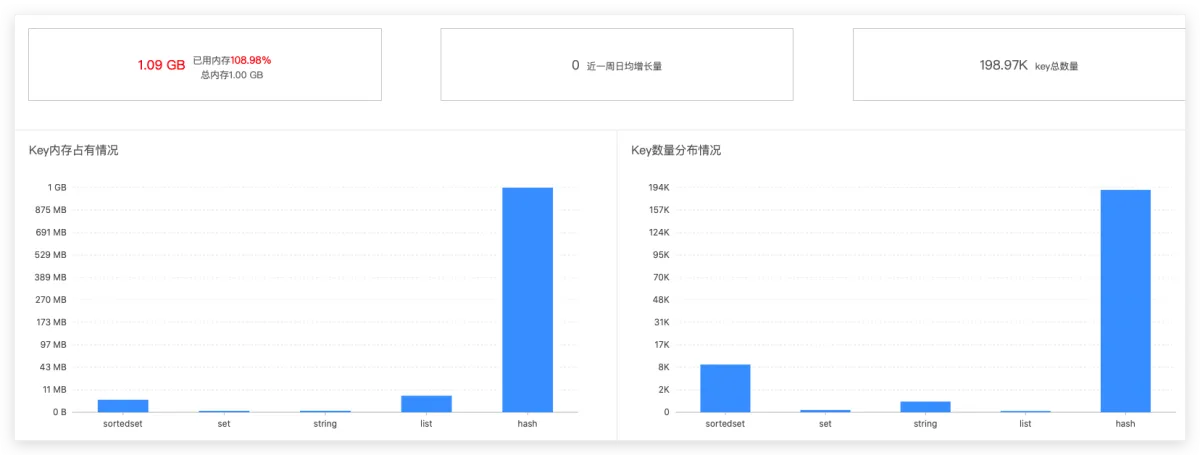
Seeing this, it was very likely a bigKey had been created. Next we did key analysis to confirm whether there really was a bigKey—was it a technical issue (not handled well), or a business issue (no proper sharding/spreading)? The final result: it was a hash key used for logging, and a single key alone exceeded Redis’s configured limit.

We asked the owner responsible for writing this key. Turns out it was only meant for the test environment, and they forgot to remove it when going to production…. Then we asked upstream teammates whether anyone used this key—no one did—so we deleted it directly.
After deleting it, the business returned to normal, and the issue ended there. The root cause was that our Redis architecture is Cluster, meaning different userIds are stored on different instances. One instance happened to hit its capacity limit, so all userId keys mapped to that instance started having problems.
Postmortem Summary
Afterwards, I checked our Redis configuration on Alibaba Cloud and found it was set to volatile-lru. That explains why as soon as I set an expiration time, the key would immediately get deleted. I was really stuck in a mental rut at the time, thinking my expire command was broken, and didn’t consider this angle.
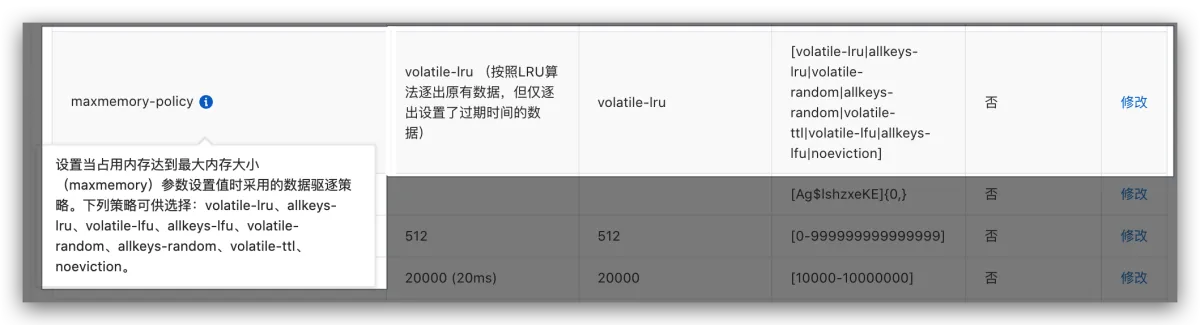
Quick refresher: these eight eviction policies as an ending (in Redis config, the parameter name is maxmemory-policy)
| Policy | Explanation |
|---|---|
| VolatileLRU | Evict existing data using LRU, but only evict keys with an expiration set |
| VolatileTTL | Only evict keys with an expiration set, evict in order of smallest-to-largest TTL |
| AllKeysLRU | Evict existing data using LRU |
| VolatileRandom | Randomly evict existing data, but only evict keys with an expiration set |
| AllKeysRandom | Randomly evict existing data |
| NoEviction(默认) | Don’t evict any data; new writes will return an error |
| VolatileLFU | Only choose from keys with expiration set and delete the least frequently used |
| AllkeysLFU | Preferentially delete the least frequently used keys |
Epilogue
Looking at it now, if something similar happens again, I can immediately think: the node hit its configured capacity limit, and Redis triggered the eviction policy. But back then, without the boss’s help, I might never have thought of this. The ironic part is: I often memorize this eviction-policy “interview boilerplate,” and it still made me fall into deep thought.
Because I’ve always complained that this kind of paper knowledge is just “boilerplate,” not nearly as practical as real programming tricks.
But when you actually hit a real problem, theoretical knowledge is your only weapon to solve production issues—assuming you don’t just memorize it, but understand the scenarios where it applies. You should code, simulate, and practice. Of course, real online incidents tend to stick in your memory even more (though the cost might be a bit high, hhhhh).
What you get from books is shallow; to truly understand, you must practice it yourself
All articles in this blog, unless otherwise stated, are licensed under @Oreoft . Please indicate the source when reprinting!