
Preface
Redis is a NoSQL storage system. It lives in memory in a key-value form, so its performance is extremely high. It provides tons of data structures and multi-language APIs, so there are many ways to play with it to implement all kinds of features and requirements. But so far, what I’ve actually used in my projects is still pretty limited. So I’ve been watching videos on Bilibili to learn more of its capabilities, hoping that one day I can apply them in my own projects.
This post will keep being updated with my learning notes. The video source is the Bilibili course in Reference 1. The instructor’s PPT is really well made—concise yet surprisingly comprehensive—highly recommended. Since there’s a lot of content, I’m splitting the Redis notes into two parts; this is Part 1.
1. Common Redis Commands
//启动容器
docker run -d -p 6379:6379 -it   --name="myredis"  redis
输入密码:
auth 密码
//进入redis容器
docker exec -it myredis  redis-cli
//退出
quit
exit
//清屏
clear
//获取帮助, 可以使用Tab键来切换
help 命令名称
help @组名Copy
2. Data Types
All keys are of type String. When we talk about data types here, we’re talking about the type of the value.
1、String
Basic operations
//设置String
set key value
mset key1 value1 key2 value2...
//设置生命周期
setex key seconds value

//得到String
get key
mget key1 key2...

//删除String
del key

//向字符串的后面追加字符,如果有就补在后面,如果没有就新建
append key valueCopy
Extended operations for string type data
Using String as a number
//增长指令,只有当value为数字时才能增长
incr key
incrby key increment
incrbyfloat key increment

//减少指令,有当value为数字时才能减少
decr key
decrby key incrementCopy
- Internally, a string in Redis is stored as a string by default. When it encounters increment/decrement operations like incr/decr, it will be converted to a numeric type for calculation.
- All Redis operations are atomic. Redis uses a single thread to handle all requests, and commands are executed one by one, so you don’t need to worry about concurrency affecting the data.
- Note: For data operated on as numbers, if the original data can’t be converted to a number, or it exceeds Redis’s numeric upper limit, it will throw an error. 9223372036854775807 (the max value of Java long, Long.MAX_VALUE)
tips:
- Redis can be used to control primary key IDs in database tables, providing an ID generation strategy and ensuring uniqueness of table primary keys.
- This solution applies to all databases and supports database clusters.
Specify TTL (lifecycle)
//设置数据的生命周期,单位 秒
setex key seconds value
//设置数据的生命周期,单位 毫秒
psetex key milliseconds valueCopy
tips
- Redis controls data lifecycle by expiring data to drive business behavior. This fits any operation with time-validity constraints.
Naming conventions
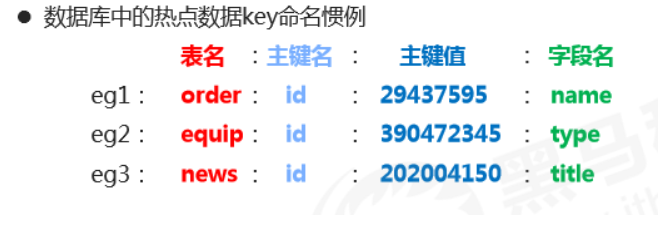
2、Hash
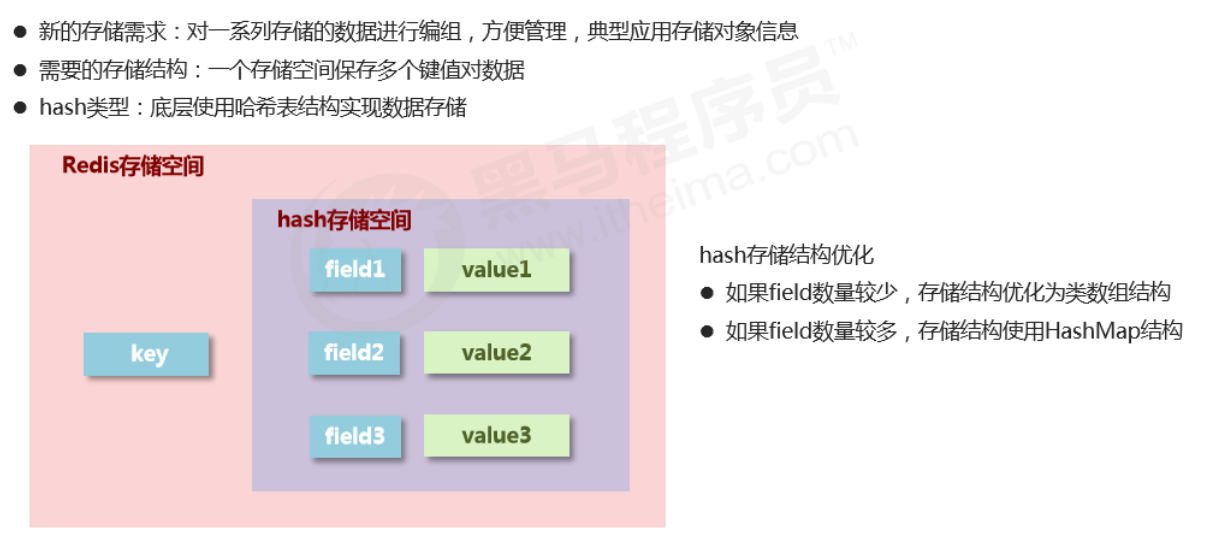
Basic operations
//插入(如果已存在同名的field,会被覆盖)
hset key field value
hmset key field1 value1 field2 value2...
//插入(如果已存在同名的field,不会被覆盖)
hsetnx key field value

//取出
hget key field
hgetall key

//删除
hdel key field1 field2...

//获取field数量
hlen key

//查看是否存在
hexists key field

//获取哈希表中所有的字段名或字段值
hkeys key
hvals key

//设置指定字段的数值数据增加指定范围的值
hincrby key field increment
hdecrby key field incrementCopy
Notes on hash type data operations
- Under the hash type, values can only store strings. Other data types are not allowed, and there is no nesting. If a value can’t be retrieved, it returns (nil).
- Each hash can store 2^32 - 1 key-value pairs.
- Hash is very close to object-like storage and allows flexible add/remove of object attributes. But hash was not designed to store a huge number of objects—don’t abuse it, and don’t use hash as an object list.
- hgetall can fetch all attributes. If there are too many fields inside, traversing everything will be very inefficient and may become a data access bottleneck.
3、List
- Data storage requirement: store multiple pieces of data and distinguish the order in which they enter the storage space
- Required storage structure: one storage space holds multiple data items, and the order of insertion can be reflected through the data
- list type: stores multiple data items; implemented with a doubly linked list underneath
- Ordered and allows duplicates
Basic operations
//添加修改数据,lpush为从左边添加,rpush为从右边添加
lpush key value1 value2 value3...
rpush key value1 value2 value3...

//查看数据, 从左边开始向右查看. 如果不知道list有多少个元素,end的值可以为-1,代表倒数第一个元素
//lpush先进的元素放在最后,rpush先进的元素放在最前面
lrange key start end
//得到长度
llen key
//取出对应索引的元素
lindex key index

//获取并移除元素(从list左边或者右边移除)
lpop key
rpop keyCopy
Extended operations
//规定时间内获取并移除数据,b=block,给定一个时间,如果在指定时间内放入了元素,就移除
blpop key1 key2... timeout
brpop key1 key2... timeout

//移除指定元素 count:移除的个数 value:移除的值。 移除多个相同元素时,从左边开始移除
lrem key count valueCopy
Notes
- Data stored in a list is all string type. Total capacity is limited: up to 2^32 - 1 elements (4294967295).
- Lists have the concept of indexes, but in practice operations are usually done as a queue (enqueue/dequeue via rpush/rpop) or as a stack (push/pop via lpush/lpop).
- To fetch all data, set the end index to -1 (the last element).
- Lists can be used for pagination: typically page 1 comes from the list, and page 2+ is loaded from the database.
4、Set
- No duplicates and unordered
Basic operations
//添加元素
sadd key member1 member2...

//查看元素
smembers key

//移除元素
srem key member

//查看元素个数
scard key

//查看某个元素是否存在
sismember key memberCopy
Extended operations
//从set中任意选出count个元素
srandmember key count

//从set中任意选出count个元素并移除
spop key count

//求两个集合的交集、并集、差集
sinter key1 key2...
sunion key1 key2...
sdiff key1 key2...

//求两个set的交集、并集、差集,并放入另一个set中
sinterstore destination key1 key2...
sunionstore destination key1 key2...
sdiffstore destination key1 key2...

//求指定元素从原集合放入目标集合中
smove source destination keyCopy
5、sorted_set
- Unique but ordered (by score)
- New storage requirement: sorting data helps with effective presentation, so we need a way to sort based on the data’s own characteristics
- Required storage structure: a new storage model that can store sortable data
- sorted_set type: adds a sortable field on top of set’s storage structure
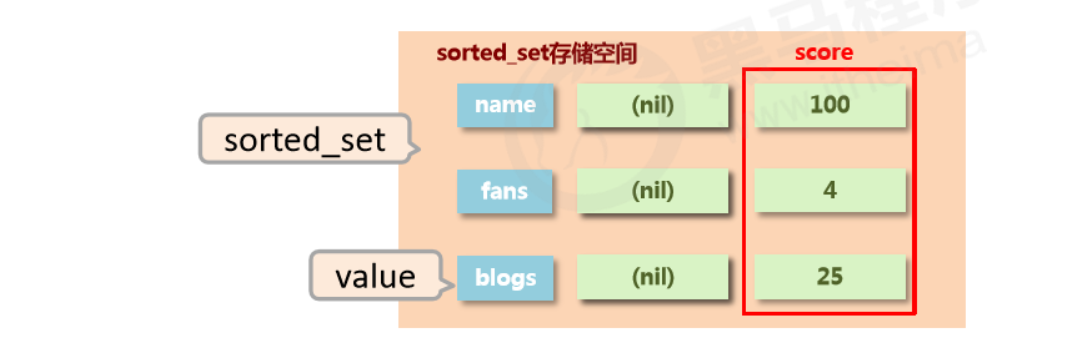
Basic operations
//插入元素, 需要指定score(用于排序)
zadd key score1 member1 score2 member2

//查看元素(score升序), 当末尾添加withscore时,会将元素的score一起打印出来
zrange key start end (withscore)
//查看元素(score降序), 当末尾添加withscore时,会将元素的score一起打印出来
zrevrange key start end (withscore)

//移除元素
zrem key member1 member2...

//按条件获取数据, 其中offset为索引开始位置,count为获取的数目
zrangebyscore key min max [withscore] [limit offset count]
zrevrangebyscore key max min [withscore] [limit offset count]

//按条件移除元素
zremrangebyrank key start end
zremrangebysocre key min max
//按照从大到小的顺序移除count个值
zpopmax key [count]
//按照从小到大的顺序移除count个值
zpopmin key [count]

//获得元素个数
zcard key

//获得元素在范围内的个数
zcount min max

//求交集、并集并放入destination中, 其中numkey1为要去交集或并集集合的数目
zinterstore destination numkeys key1 key2...
zunionstore destination numkeys key1 key2...Copy
Notes
- min and max are used to constrain the conditions of the search query.
- start and stop are used to constrain the query range by index (start and end index).
- offset and count constrain the query range on the result set, representing the start position and total amount of data.
Extended operations
//查看某个元素的索引(排名)
zrank key member
zrevrank key member

//查看某个元素索引的值
zscore key member
//增加某个元素索引的值
zincrby key increment memberCopy
####
Notes
- The storage space for score is 64-bit. If it’s an integer, the range is -9007199254740992~9007199254740992.
- score can also be a double-precision value. Due to the nature of floating-point numbers, precision may be lost, so use it carefully.
- sorted_set is still based on set underneath, so data cannot be duplicated. If you add the same member repeatedly, the score will be overwritten repeatedly, and the last modification is kept.
3. Common Commands
1、Characteristics of keys
- A key is a string, and you use it to retrieve data stored in Redis.
2、Key operations
Basic operations
//查看key是否存在
exists key

//删除key
del key

//查看key的类型
type keyCopy
Extended operations (TTL / expiration)
//设置生命周期
expire key seconds
pexpire key milliseconds

//查看有效时间, 如果有有效时间则返回剩余有效时间, 如果为永久有效,则返回-1, 如果Key不存在则返回-2
ttl key
pttl key

//将有时限的数据设置为永久有效
persist keyCopy
Extended operations (query)
//根据key查询符合条件的数据
keys patternCopy
Query rules
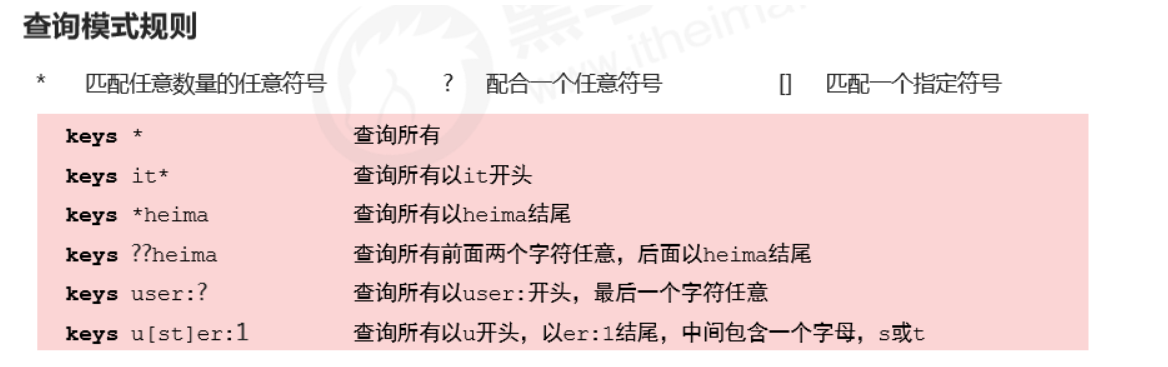
Extended operations (others)
//重命名key,为了避免覆盖已有数据,尽量少去修改已有key的名字,如果要使用最好使用renamenx
rename key newKey
renamenx key newKey

//查看所有关于key的操作, 可以使用Tab快速切换
help @genericCopy
3、Database common operations
Databases
- Redis provides 16 databases per server, numbered from 0 to 15.
- Data between databases is isolated from each other.
Basic operations
//切换数据库 0~15
select index

//其他操作
quit
ping
echo massageCopy
Extended operations
//移动数据, 必须保证目的数据库中没有该数据
mov key db

//查看该库中数据总量
dbsizeCopy
3. Jedis
To operate Redis in Java, you need to import the jar or add a Maven dependency.
1、Steps to operate Redis in Java
- Connect to Redis
//参数为Redis所在的ip地址和端口号
Jedis jedis = new Jedis(String host, int port)Copy
- Operate Redis
//操作redis的指令和redis本身的指令几乎一致
jedis.set(String key, String value);Copy
- Close the connection
jedis.close();Copy
2、Configuration utility
- Config file
redis.host=47.103.10.63
redis.port=6379
redis.maxTotal=30
redis.maxIdle=10Copy
- Utility class
import redis.clients.jedis.Jedis;
import redis.clients.jedis.JedisPool;
import redis.clients.jedis.JedisPoolConfig;
import java.util.ResourceBundle;

/**
 * @author Chen Panwen
 * @data 2020/4/6 16:24
 */
public class JedisUtil {
	private static Jedis jedis = null;
	private static String host = null;
	private static int port;
	private static int maxTotal;
	private static int maxIdle;

	//使用静态代码块,只加载一次
	static {
		//读取配置文件
		ResourceBundle resourceBundle = ResourceBundle.getBundle("redis");
		//获取配置文件中的数据
		host = resourceBundle.getString("redis.host");
		port = Integer.parseInt(resourceBundle.getString("redis.port"));
		//读取最大连接数
		maxTotal = Integer.parseInt(resourceBundle.getString("redis.maxTotal"));
		//读取最大活跃数
		maxIdle = Integer.parseInt(resourceBundle.getString("redis.maxIdle"));
		JedisPoolConfig jedisPoolConfig = new JedisPoolConfig();
		jedisPoolConfig.setMaxTotal(maxTotal);
		jedisPoolConfig.setMaxIdle(maxIdle);
		//获取连接池
		JedisPool jedisPool = new JedisPool(jedisPoolConfig, host, port);
		jedis = jedisPool.getResource();
	}

	public Jedis getJedis() {
		return jedis;
	}
}Copy
4. Persistence
Redis container configuration: redis.conf
-
The config file inside the Redis container needs to be mapped in when creating the container.
停止容器:docker container stop myredis 删除容器:docker container rm myredisCopy -
Recreate the container
1. 创建docker统一的外部配置文件 mkdir -p docker/redis/{conf,data} 2. 在conf目录创建redis.conf的配置文件 touch /docker/redis/conf/redis.conf 3. redis.conf文件的内容需要自行去下载,网上很多 4. 创建启动容器,加载配置文件并持久化数据 docker run -d --privileged=true -p 6379:6379 -v /docker/redis/conf/redis.conf:/etc/redis/redis.conf -v /docker/redis/data:/data --name myredis redis redis-server /etc/redis/redis.conf --appendonly yesCopy -
Directory
/docker/redisCopy
1、Introduction
What is persistence?
Persistence is a mechanism that saves data using permanent storage media and restores the saved data at a specific time.
Why persist?
To prevent accidental data loss and ensure data security.
What does persistence save?
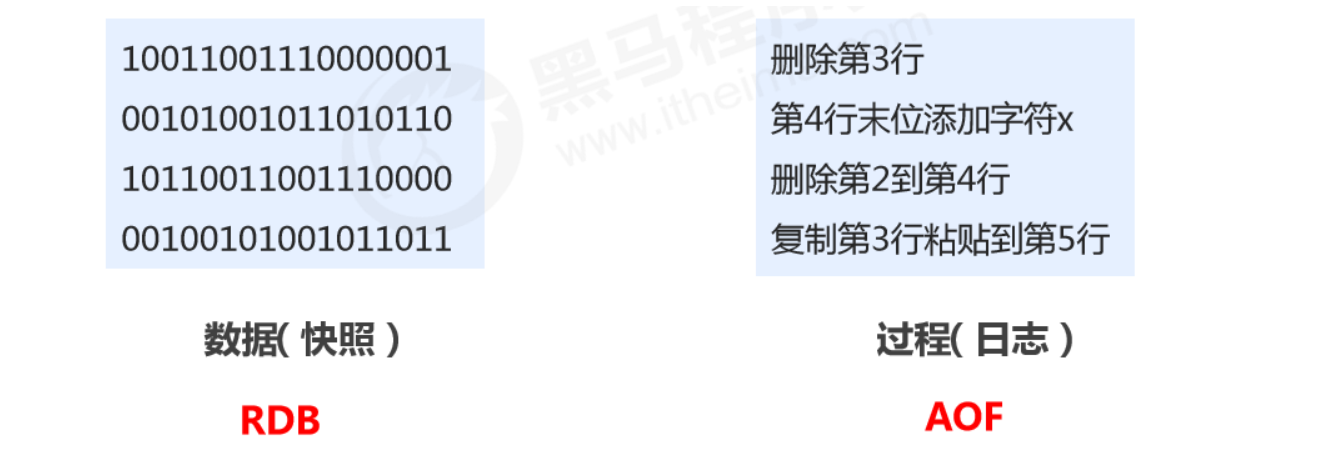
- Save the current data state as a snapshot: store the data result; simple format; focus is on the data
- Save the operation process as a log: store the operation process; complex format; focus is on the data operation process
2、RDB
RDB startup method — save
-
Command
saveCopy -
Purpose
Manually execute a save operation once.
RDB configuration-related directives
- dbfilename dump.rdb
- Description: set the local database filename; default is dump.rdb
- Tip: usually set to dump-
.rdb
- dir
- Description: set the path to store the .rdb file
- Tip: usually set to a directory with plenty of space, typically named data
- rdbcompression yes
- Description: whether to compress data when storing to local DB; default yes, using LZF compression
- Tip: usually keep it enabled. If set to no, it can save CPU time but makes the stored file larger (huge).
- rdbchecksum yes
- Description: whether to perform RDB file format checksum validation; done during both write and read
- Tip: usually keep it enabled. If set to no, it can save about 10% time overhead in read/write, but introduces a risk of data corruption.
How the RDB save command works
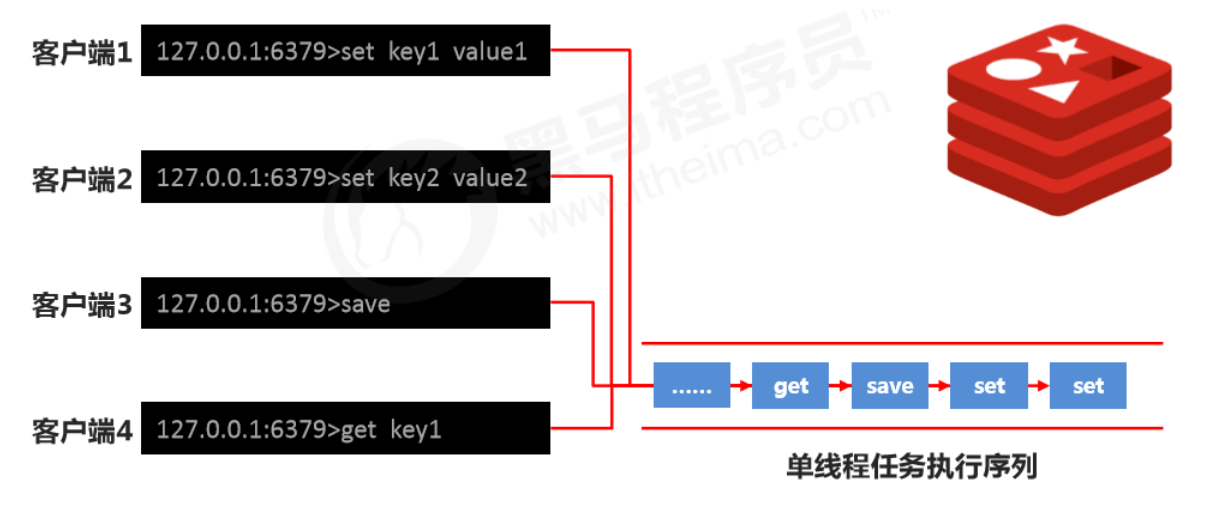
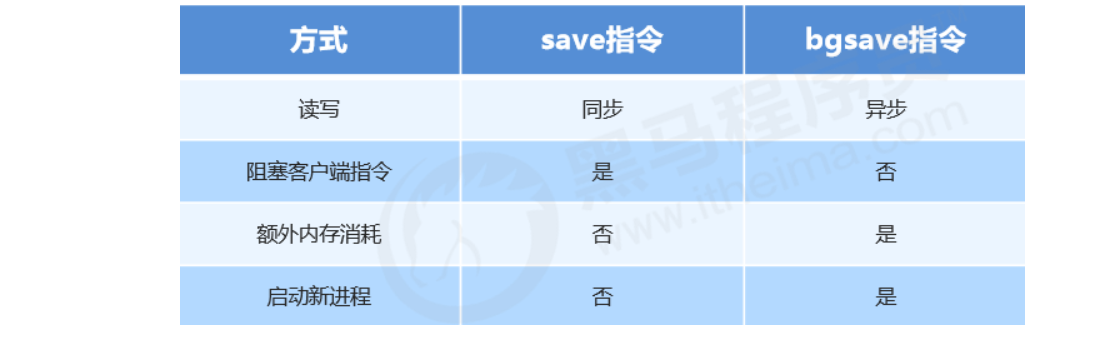
Note: Executing the save command will block the current Redis server until the RDB process completes. This may cause long blocking, so it’s not recommended in production.
RDB startup method — bgsave
-
Command
bgsaveCopy -
Purpose
Manually start a background save operation, but not executed immediately.
How the RDB bgsave command works
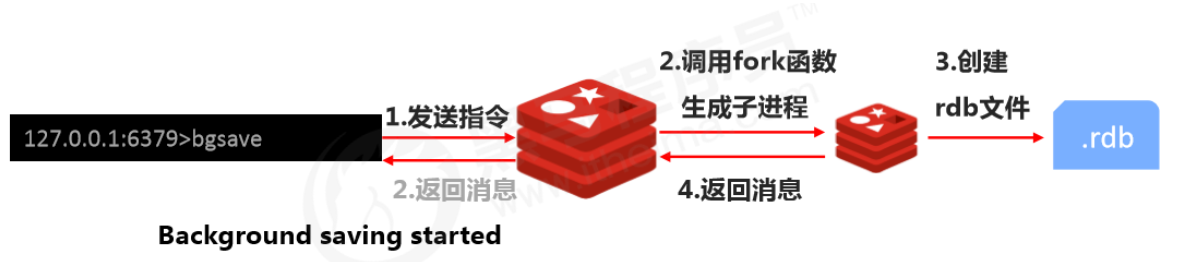
Note: The bgsave command is an optimization for the blocking issue of save. Internally, Redis uses bgsave for all RDB-related operations. You can basically stop using save; bgsave is recommended.
You can check bgsave logs via Redis logs
docker logs myredisCopy
RDB startup method — save configuration
-
Configuration
save second changesCopy -
Purpose
If the number of key changes within a limited time reaches the specified amount, persistence is triggered.
-
Parameters
- second: monitoring time window
- changes: number of key changes monitored
-
Where to configure
In the conf file
How the RDB save configuration works
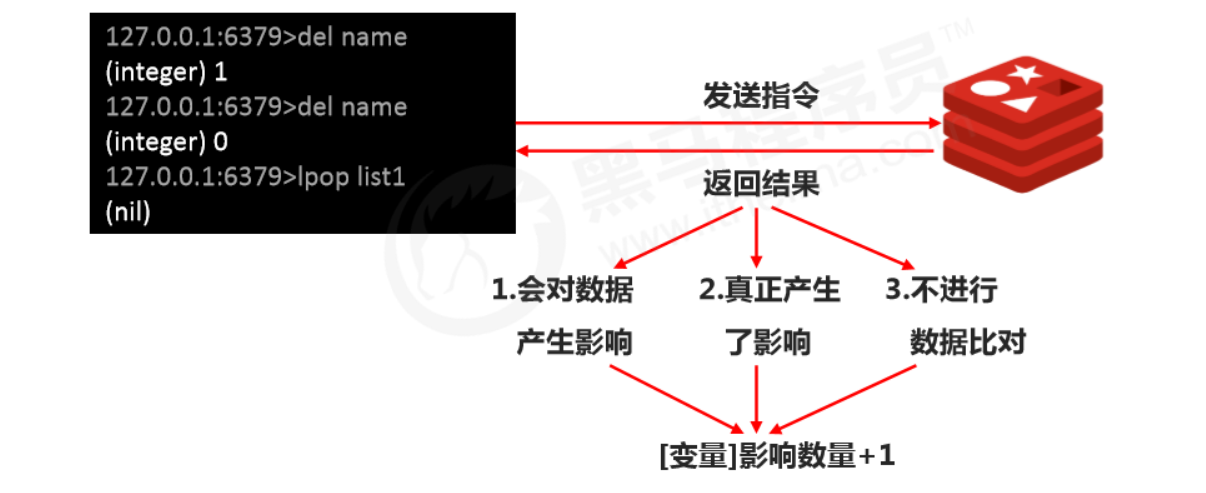
Notes:
- Configure save based on real business needs. Too frequent or too infrequent can cause performance issues, and the result can be disastrous.
- In save configuration, second and changes usually have a complementary relationship (one large, one small). Try not to set them in an inclusive relationship.
- After save configuration is enabled, it actually executes bgsave.
Comparison of RDB startup methods
Pros and cons of RDB
- Pros
- RDB is a compact, compressed binary file with high storage efficiency.
- RDB stores a snapshot of Redis data at a point in time, making it ideal for data backup, full replication, etc.
- RDB restores data much faster than AOF.
- Use case: run bgsave every X hours on the server and copy the RDB file to a remote machine for disaster recovery.
- Cons
- Whether via command or configuration, RDB cannot achieve real-time persistence, so there’s a significant chance of data loss.
- Each bgsave run performs a fork to create a child process, which costs some performance.
- Across many Redis versions, the RDB file format is not fully unified; data formats may be incompatible between different versions.
3、AOF
AOF concept
- AOF (append only file) persistence: records every write command in an independent log. On restart, Redis replays the commands in the AOF file to restore data. Compared to RDB, you can think of it as switching from recording data to recording the process that produces the data.
- AOF mainly solves the real-time aspect of persistence and is now the mainstream persistence method in Redis.
AOF write process
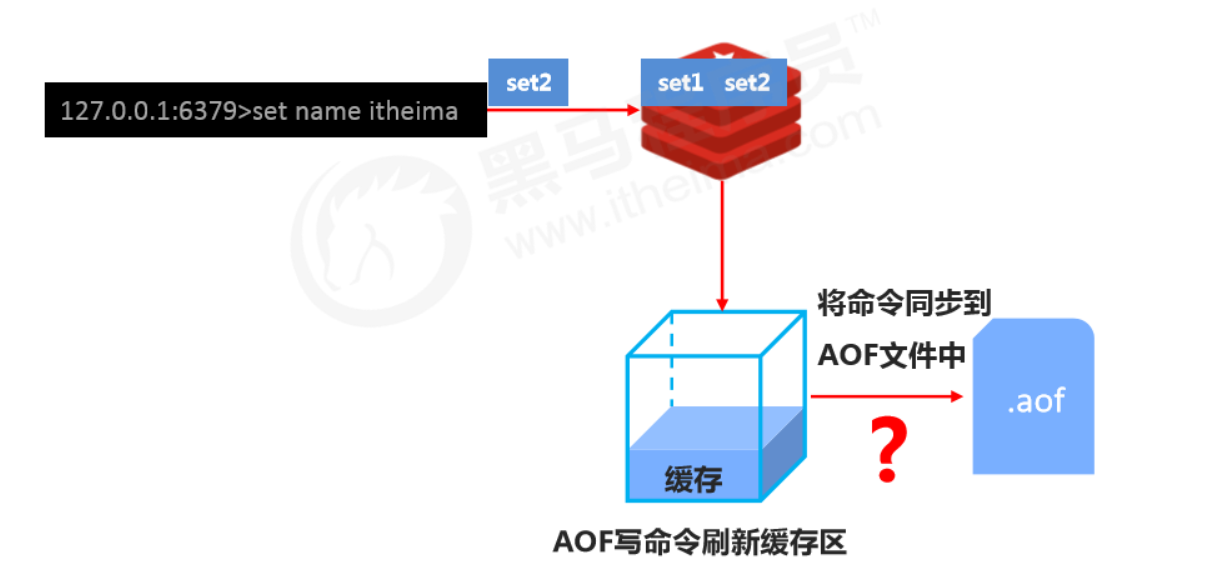
Three AOF write strategies (appendfsync)
- always
- Every write is synced to the AOF file. Zero data loss, but low performance; not recommended.
- everysec
- Sync commands from the buffer to the AOF file every second. High accuracy and high performance; recommended, and it’s the default.
- In case of sudden crash, up to 1 second of data may be lost.
- no
- The OS controls the sync cycle; the overall process is uncontrollable.
Enable AOF
-
Configuration
appendonly yes|noCopy- Purpose
- Whether to enable AOF persistence; disabled by default
-
Configuration
appendfsync always|everysec|noCopy- Purpose
- AOF write strategy
- Purpose
AOF rewrite
Purpose
- Reduce disk usage and improve disk utilization
- Improve persistence efficiency, reduce persistence write time, and improve IO performance
- Reduce recovery time and improve recovery efficiency
Rules
-
Expired data in the process is no longer written to the file
-
Ignore
invalid commands
. During rewrite, it generates directly from in-memory data, so the new AOF file
only keeps the final write commands for the final data
- e.g. del key1, hdel key2, srem key3, set key4 111, set key4 222, etc.
-
Merge multiple write commands for the same data into a single command
- e.g. lpush list1 a, lpush list1 b, lpush list1 c can be rewritten as: lpush list1 a b c
- To prevent client buffer overflow due to too much data, for list/set/hash/zset, each command writes at most 64 elements.
How to use
-
Manual rewrite
bgrewriteaofCopy -
Automatic rewrite
auto-aof-rewrite-min-size size
auto-aof-rewrite-percentage percentageCopy
How it works
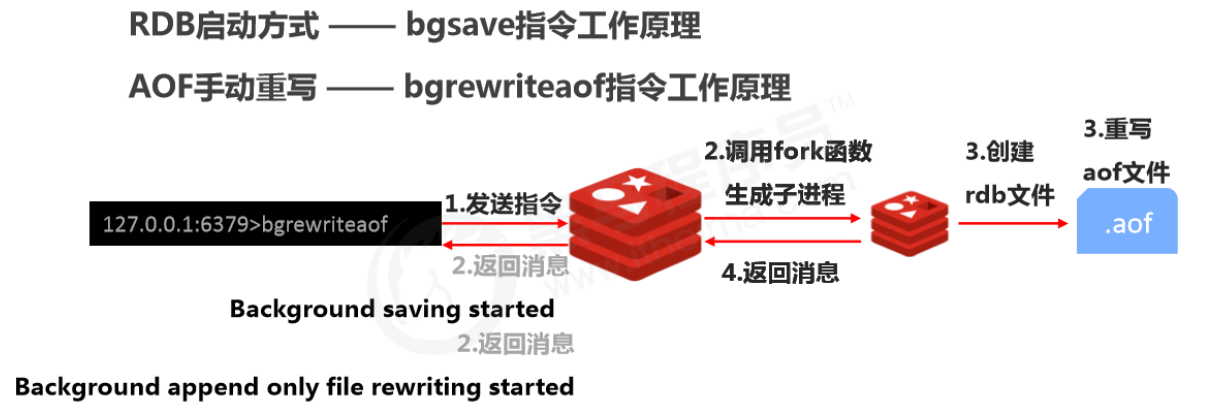
AOF automatic rewrite
-
Configure auto-rewrite trigger conditions
//触发重写的最小大小 auto-aof-rewrite-min-size size //触发重写须达到的最小百分比 auto-aof-rewrite-percentage percentCopy -
Auto-rewrite comparison parameters (run
info Persistenceto get details)//当前.aof的文件大小 aof_current_size //基础文件大小 aof_base_sizeCopy -
Auto-rewrite trigger condition

How it works
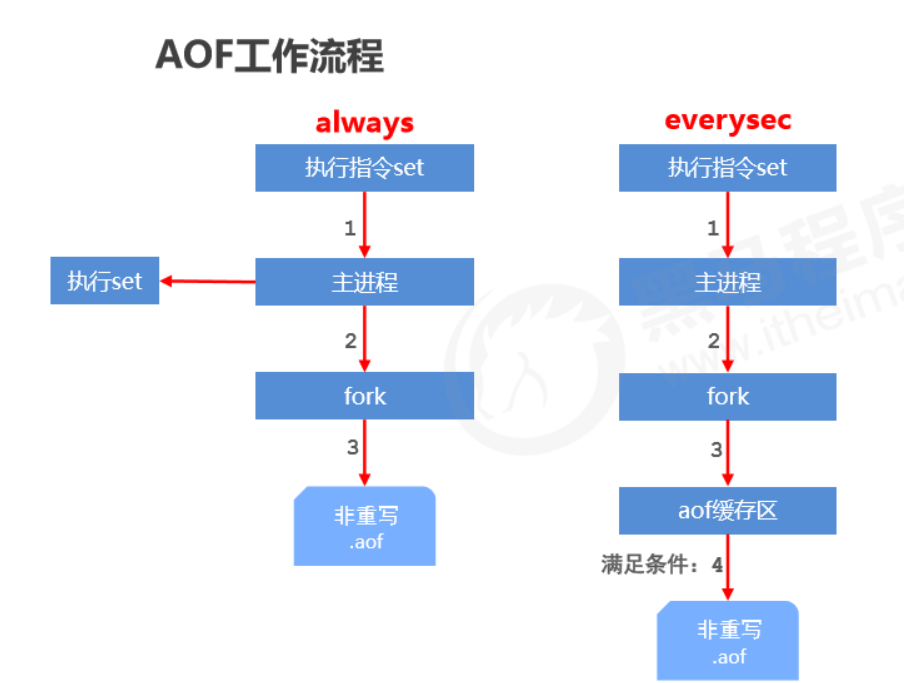
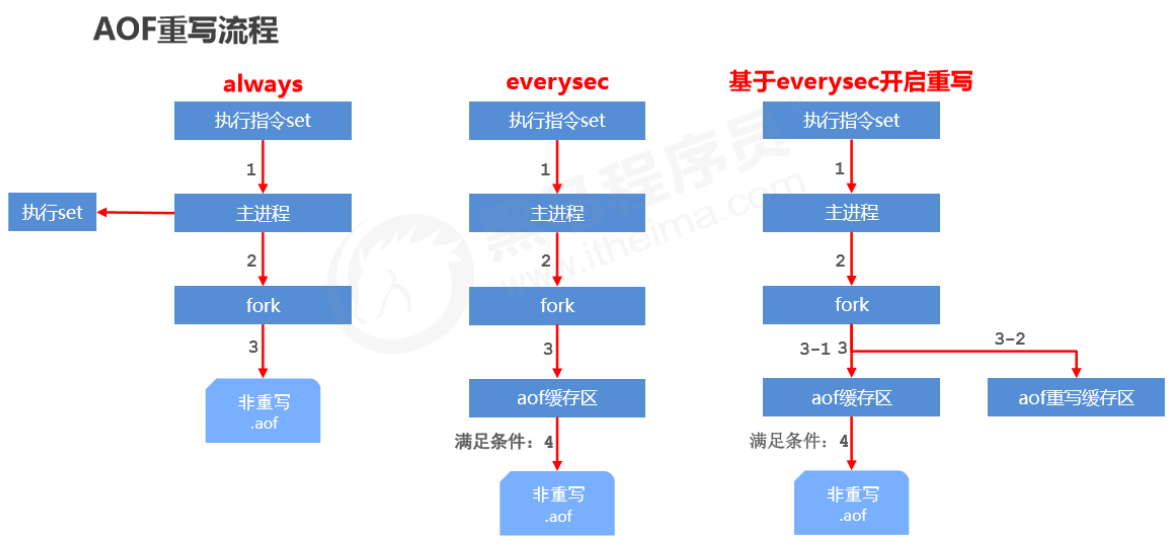
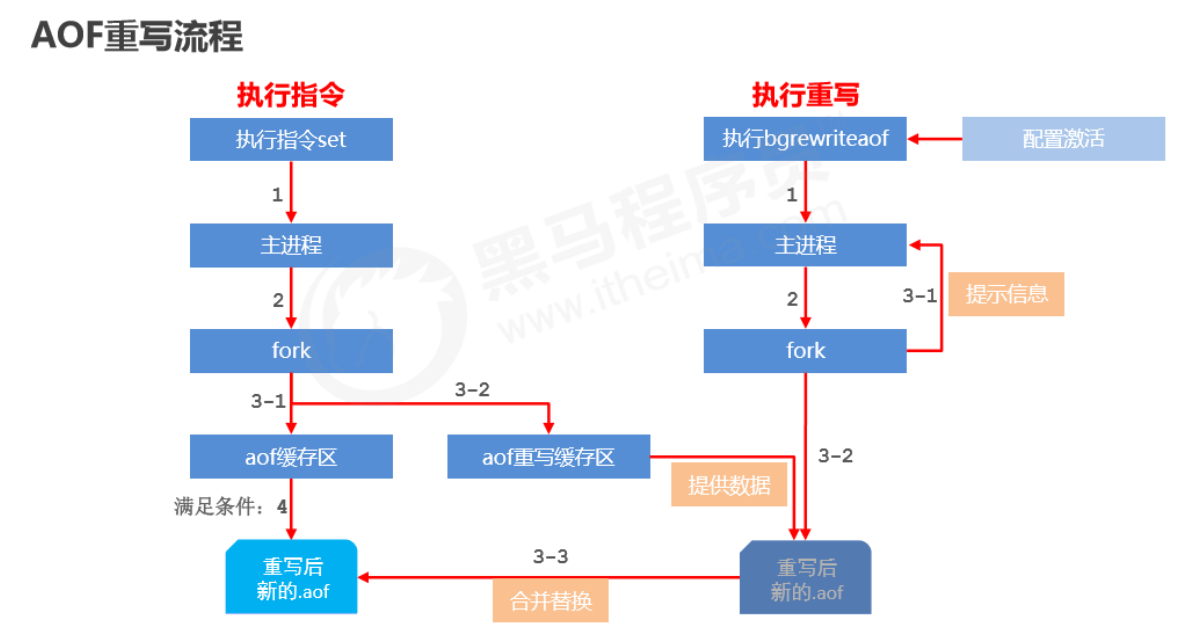
Buffering strategy
The AOF buffer sync-to-file strategy is controlled by appendfsync.
- The write operation triggers a delayed write mechanism. Linux provides a page cache in the kernel to improve disk IO performance. After writing to the system buffer, write returns immediately. Syncing to disk depends on the OS scheduling mechanism, e.g., when the page cache is full or a specific time interval is reached. If the system crashes before syncing, data in the buffer will be lost.
- fsync forces a hard sync to disk for a single file (e.g., the AOF file). fsync blocks until the write to disk completes, ensuring persistence.
4、RDB VS AOF
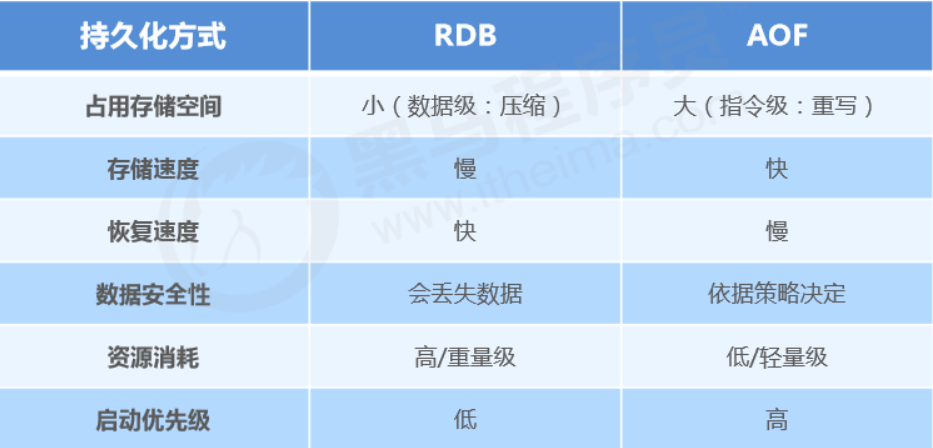
The dilemma of choosing between RDB and AOF
-
If you’re extremely
sensitive
to data, it’s recommended to use the default
AOF
persistence solution
- Use everysecond for AOF: fsync once per second. Redis can still maintain good performance, and in case of issues, at most 0–1 second of data is lost.
- Note: AOF files are large, and recovery is slower.
-
If your data has
stage validity
, it’s recommended to use the RDB persistence solution
- Data can be well maintained without loss within a stage (a stage manually maintained by developers/ops), and recovery is faster. Stage-point recovery usually uses RDB.
- Note: Using RDB for compact persistence can make Redis performance drop significantly.
-
Overall comparison
- Choosing between RDB and AOF is essentially a trade-off; each has pros and cons.
- If you can’t tolerate losing even a few minutes of data and are very sensitive to business data, choose AOF.
- If you can tolerate losing a few minutes of data and want faster recovery speed for large datasets, choose RDB.
- Use RDB for disaster recovery.
- Dual insurance: enable both RDB and AOF. After restart, Redis will prioritize AOF to restore data, reducing data loss.
5. Redis Transactions
1、Definition of Redis transactions
A Redis transaction is a queue of commands. It wraps a series of predefined commands into a whole (a queue). When executed, they are executed in order all at once, without being interrupted or interfered with in the middle.
2、Basic transaction operations
-
Start a transaction
multiCopy- Purpose
- Marks the start of a transaction. After this command, all subsequent commands are added into the transaction.
- Purpose
-
Cancel a transaction
discardCopy- Purpose
- Terminates the current transaction definition, occurring after multi and before exec.
- Purpose
-
Execute a transaction
execCopy- Purpose
- Marks the end of the transaction and executes it. Paired with multi, used together.
- Purpose
3、Basic transaction flow
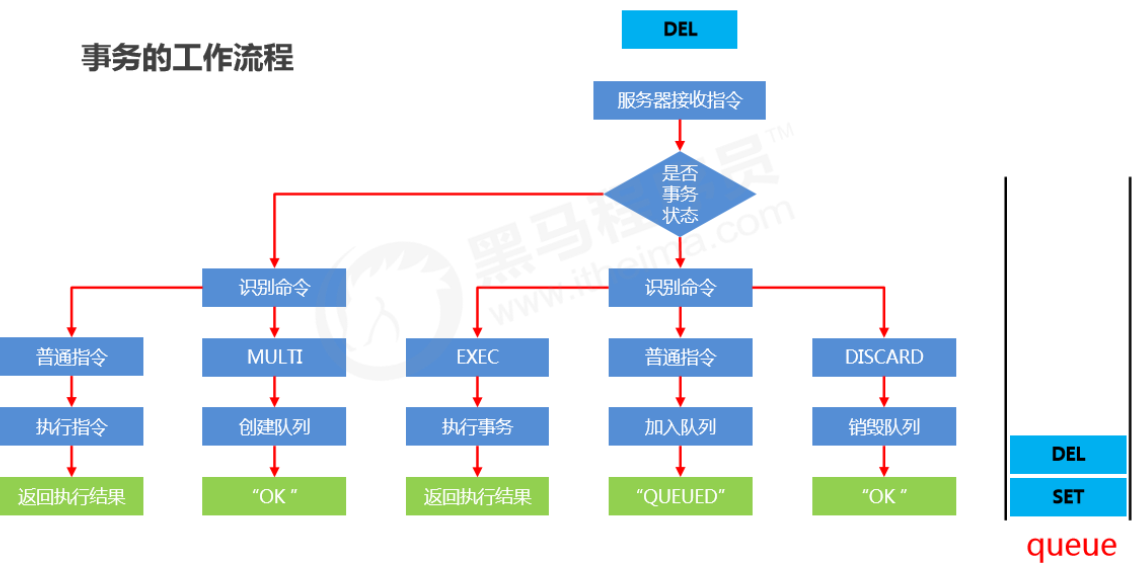
4、Notes on transaction operations
What if I enter a wrong command format while defining the transaction?
- Syntax error
- Command format is wrong, e.g., executing a non-existent command
- Result
- If the transaction contains any syntax error, none of the commands in the transaction will execute, including those that are syntactically correct.
What if a command fails during execution while defining the transaction?
- Runtime error
- Command format is correct, but it cannot execute correctly, e.g., running incr on a list
- Result
- Commands that can run correctly will execute; commands with runtime errors will not execute.
Note: Data changes from commands that have already executed will not automatically roll back. You need to implement rollback in your own code.
5、Conditional transaction execution
Locks
-
Add a watch lock to keys. If the key changes before exec, terminate the transaction.
watch key1, key2....Copy -
Cancel watching all keys
unwatchCopy
Distributed lock
-
Use setnx to set a shared lock
//上锁 setnx lock-key value //释放锁 del lock-keyCopy- Based on the return value of setnx: if there is a value (already locked), setting fails; if there is no value (not locked), setting succeeds.
- After finishing, release the lock via del.
Note: The above solution is a design concept that relies on conventions for guarantees, and it carries risks.
Strengthened distributed lock
-
Use expire to add a time limit to the lock key; if it’s not released in time, give up the lock.
expire lock-key seconds pexpire lock-key millisecondsCopy -
Since operations are usually at microsecond or millisecond level, the lock time should not be set too large. The exact time needs to be confirmed through business testing.
- Example: the longest execution time while holding the lock is 127ms, the shortest is 7ms.
- Test the maximum command time over a million runs, and test the average network latency over a million runs.
- Recommended lock time: max time * 120% + average network latency * 110%
- If max business time « average network latency (usually by 2 orders of magnitude), just take the longer single time cost.
References
All articles in this blog, unless otherwise stated, are licensed under @Oreoft . Please indicate the source when reprinting!