
Preface
In the last project I introduced Mybatis-Plus (the name is way too long, so I’ll call it MP from now on). I habitually enable the performance analysis plugin locally so I can print SQL info, but this time I couldn’t find the PerformanceInterceptor class. After checking MP’s release notes, I found that PerformanceInterceptor was actually removed in version 3.2. And our project is using 3.4.0.
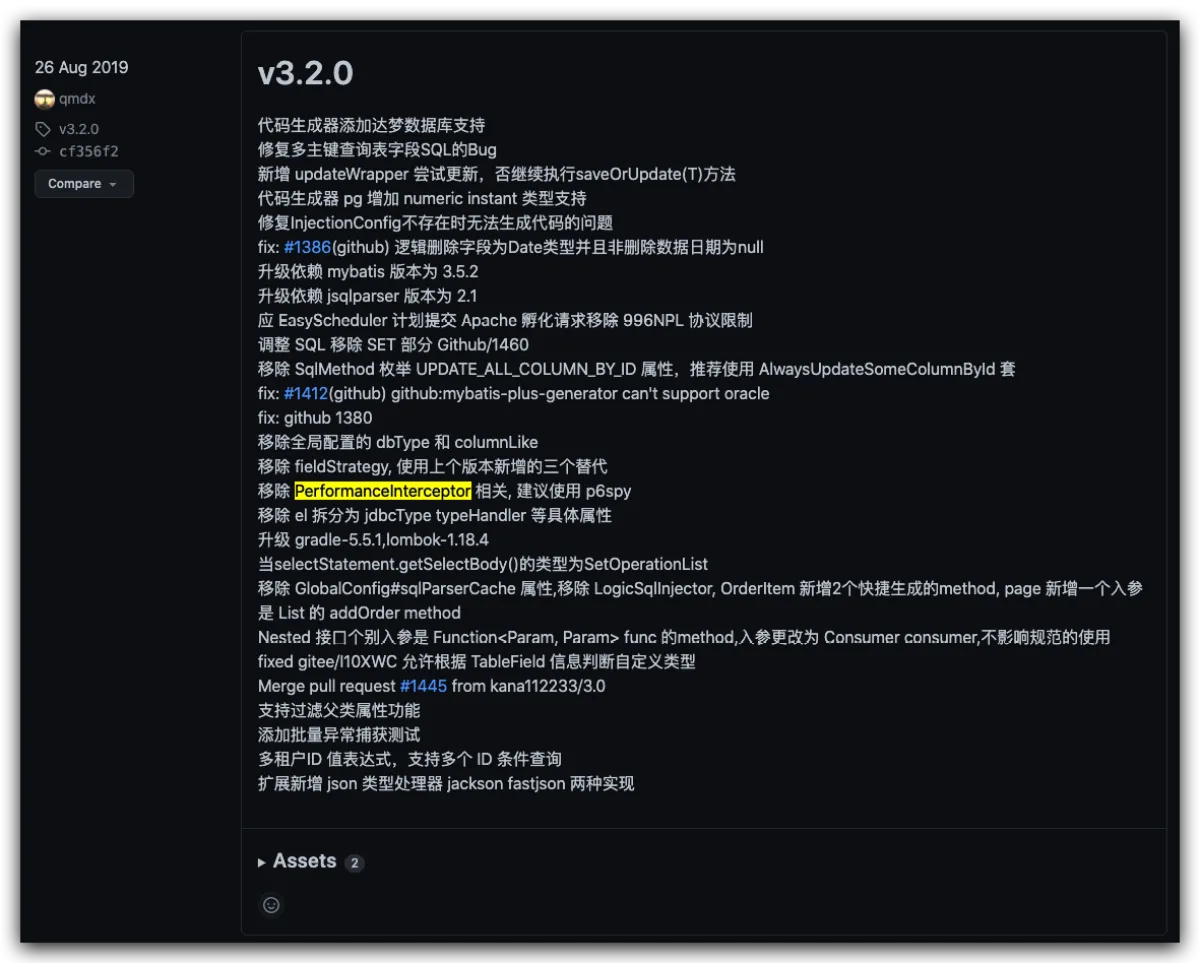
It also mentions using p6spy as a replacement. After some digging, I summarized three ways to print SQL logs, and I’m sharing them here.
The code for this project has been uploaded to GitHub, click here
Three approaches
Also! Also! Also! Printing SQL logs has a pretty big impact on performance, so never enable it in production. I usually turn it on when debugging locally—especially for cross-module calls in microservices, it’s insanely useful. You only need to set a breakpoint on the caller side; on the callee side you just print the SQL. If the data isn’t what you expect, check the SQL printed in the console, or paste it into DataGrip and run it.
Create a table in the DB for testing. Here I’m creating a t_user table under the test database, with the DDL below:
create table t_user
(
    id          int unsigned primary key auto_increment comment 'pk',
    username    varchar(255) not null default '' comment '用户名',
    password    varchar(100) not null default '123456' comment '用户密码',
    gender      char         not null default '0' comment '性别',
    phone       varchar(30)  not null default '' comment '手机',
    create_time datetime     not null default CURRENT_TIMESTAMP comment '创建时间'
) comment '用户表';
Import dependencies in advance 🔗
<dependency>
  	<groupId>mysql</groupId>
  	<artifactId>mysql-connector-java</artifactId>
  	<version>8.0.19</version>
</dependency>
<dependency>
  	<groupId>com.baomidou</groupId>
  	<artifactId>mybatis-plus-boot-starter</artifactId>
  	<!-- Just import any version for now -->
  	<version>3.1.2</version>
</dependency>
Then create a BO
@Data
@TableName("t_user")
public class TUser {

    /**
     * pk
     */
    @TableId(type = IdType.AUTO)
    private Long id;

    /**
     * Mock username
     */
    private String username;

    /**
     * Mock password, stored in plaintext for demo purposes
     */
    private String password;

    /**
     * Mock gender
     */
    private Integer gender;

    /**
     * Mock phone number
     */
    private String phone;

    /**
     * Created time
     */
    private LocalDateTime createTime;

}
Then write a Mapper
@Mapper
public interface TUserMapper extends BaseMapper<TUser> {
}
Finally, write a Test runner class
public class MybatisSqlLogTest {

    /**
     * Being lazy here—using the mapper to demonstrate how query logs look
     */
    @Resource
    private TUserMapper tUserMapper;

    @Test
    public void selectPrintLogTest() {
        LambdaQueryWrapper<TUser> query = new LambdaQueryWrapper<TUser>()
                .select(TUser::getId, TUser::getPhone, TUser::getGender)
                .eq(TUser::getGender, 0)
                .likeRight(TUser::getUsername, "小");
        TUser result = tUserMapper.selectOne(query);
        System.out.printf("The queried id is %s, phone is %s\n", result.getId(), result.getPhone());
    }
}
Enable MyBatis built-in log output (SQL + params)
This is a built-in MyBatis feature. Enabling it is super simple: just add the following line to your config file. Usually we have multiple config files, so I recommend enabling it only in dev—just add it to your dev config.
mybatis-plus:
  configuration:
    log-impl: org.apache.ibatis.logging.stdout.StdOutImpl
It starts with mybatis-plus because MP is compatible with MyBatis config. You can also change the top-level key to mybatis: and it will still work.
Finally, run the test class (the setup demo is above—scroll up and check it)
The downside is that the output isn’t a final executable SQL log; you need to assemble/convert the format yourself. The output looks like this:
Creating a new SqlSession
SqlSession [org.apache.ibatis.session.defaults.DefaultSqlSession@16132f21] was not registered for synchronization because synchronization is not active
JDBC Connection [HikariProxyConnection@1271323139 wrapping com.mysql.cj.jdbc.ConnectionImpl@4f59a516] will not be managed by Spring
==>  Preparing: SELECT id,phone,gender FROM t_user WHERE gender = ? AND username LIKE ?
==> Parameters: 0(Integer), 小%(String)
<==    Columns: id, phone, gender
<==        Row: 1, 13333333333, 0
<==      Total: 1
Closing non transactional SqlSession [org.apache.ibatis.session.defaults.DefaultSqlSession@16132f21]
You need to take the two lines containing ==> and convert them using some plugin or third-party tool. For example, I use the mybatisLog tool inside uTools, and the converted result looks like this:
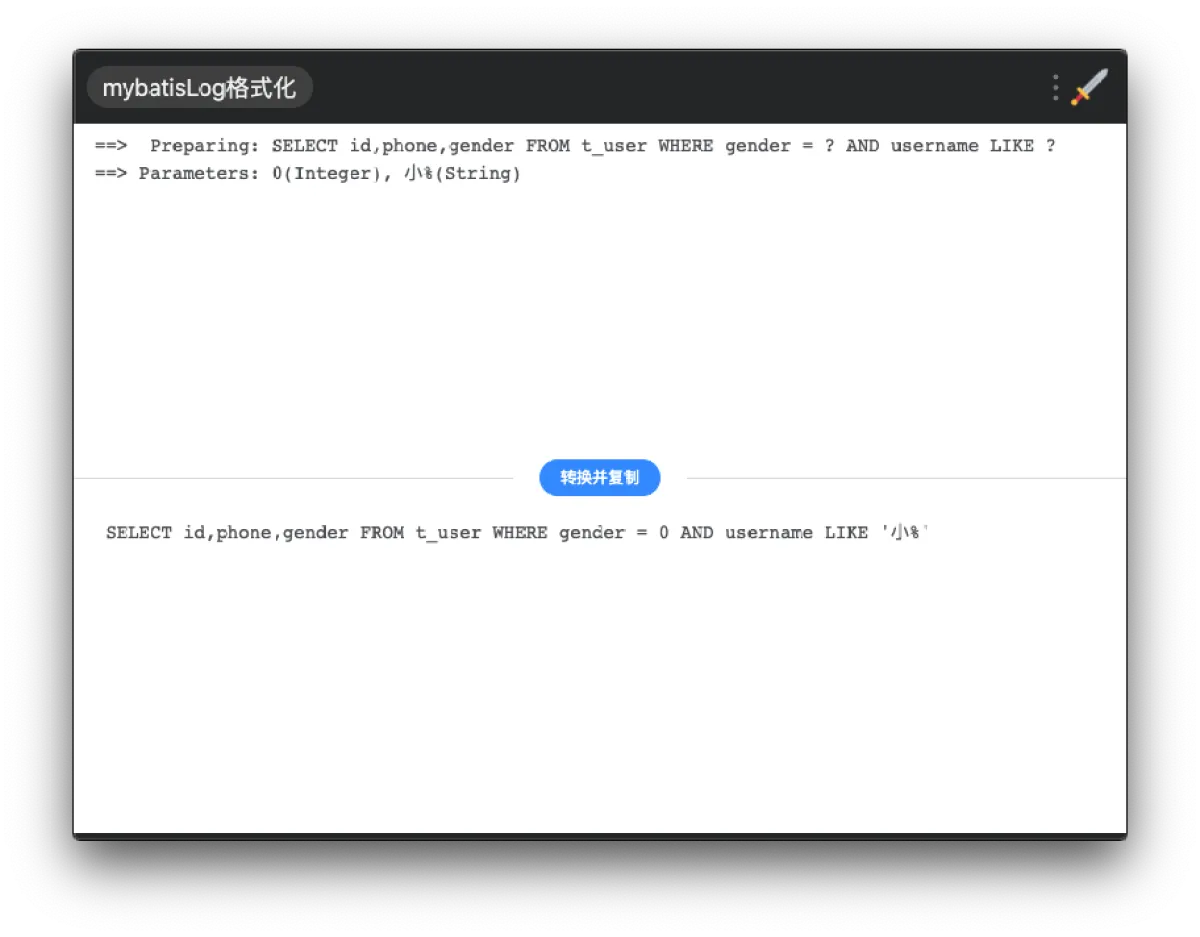
This is “native”, but kind of annoying and not very intuitive. If the SQL is long and a single request session has lots of statements, it’s basically unreadable—might as well not look at it.
Use the plugin in MP versions below 3.2
Use the PerformanceInterceptor plugin provided by MP before 3.2. This is the approach I used the most before, and it’s the most convenient. The configuration is also very straightforward, and it’s easy to separate by environment.
Just like other MP plugins (e.g., pagination), you create a bean, set it up, and put it into the IoC container. When MP runs, it will use your bean to apply the plugin behavior.
First, make sure your MP version is below 3.2:
<dependency>
  	<groupId>com.baomidou</groupId>
  	<artifactId>mybatis-plus-boot-starter</artifactId>
  	<!-- Make sure the version is below 3.2 -->
  	<version>3.1.2</version>
</dependency>
Then create a config class and inject a PerformanceInterceptor bean:
@Configuration
public class MybatisPlusSqlLogConfig {


    /**
     * Print SQL, performance analysis interceptor
     * Since every SQL needs to be intercepted, there will be performance overhead
     * So it's recommended to enable it only in dev or test for debugging
     * If multiple environments -> @Profile({"dev", "test"})
     * @return PerformanceInterceptor bean
     */
    @Bean
    @Profile("mp")
    public PerformanceInterceptor performanceInterceptor() {
        PerformanceInterceptor performanceInterceptor = new PerformanceInterceptor();
        // Enable formatting, similar to DataGrip's SQL beautification, looks nicer in console
        performanceInterceptor.setFormat(true);
        return performanceInterceptor;
    }
}
One thing worth noting: you can add @Profile("dev") after @Bean. As long as your dev config file is application-dev.yml, this bean will only be injected in the dev environment. So you don’t have to worry about performance impact in production. In my code I use mp as the profile for the plugin demo, so here it only takes effect under mp.
Finally, run the test class (the setup demo is above—scroll up and check it)
The result looks like this—very intuitive, and it’s also in red text:
 Time:22 ms - ID:cn.someget.mybatis.sqllog.mapper.TUserMapper.selectOne
Execute SQL:
    SELECT
        id,
        phone,
        gender
    FROM
        t_user
    WHERE
        gender = 0
        AND username LIKE '小%'

查询到的id是1, 电话是13333333333
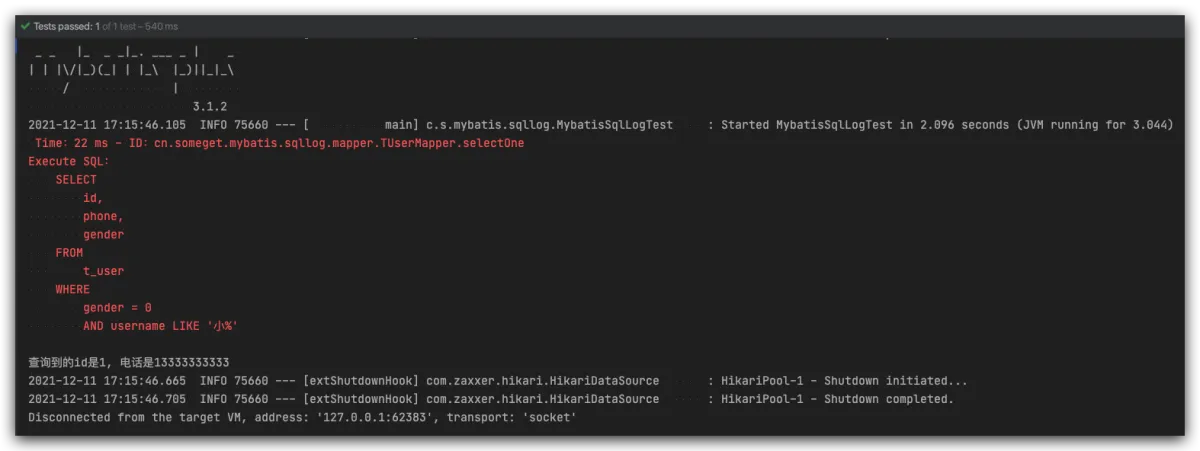
It used to be super handy. Maybe the author thought the performance impact was too big, and to prevent misuse, they removed it in version 3.2….
Use p6spy in MP 3.2 and above
So now I know for sure this isn’t suitable for production, but I still want something convenient for local debugging. Besides downgrading MP, what else can I do? The author also recommends p6spy in the release notes.
P6Spy is an open-source framework that can intercept and modify data operation statements in your application. Its GitHub repo is here. It’s very powerful; here I’ll only cover the parts that meet the needs of SQL performance analysis and log output.
First, add the dependency. I’ll just pick a random version here—see all versions here.
<dependency>
    <groupId>p6spy</groupId>
    <artifactId>p6spy</artifactId>
    <version>3.8.2</version>
</dependency>
Then in your config file, when configuring the datasource connection, change the driver class name and the URL:
# Configure MySQL connection info
spring:
  datasource:
#   driver-class-name: com.mysql.cj.jdbc.Driver  this was the original
    driver-class-name: com.p6spy.engine.spy.P6SpyDriver
#   url: jdbc:mysql://${mysql.host}  this was the original URL prefix
    url: jdbc:p6spy:mysql://${mysql.host}:3306/test?useUnicode=true&characterEncoding=utf8&autoReconnect=true&failOverReadOnly=false&useSSL=false
    username: root
    password: 123456
Finally, create a spy.properties file under resources and write some basic config:
# Output logs to console
appender=com.baomidou.mybatisplus.extension.p6spy.StdoutLogger

# Formatting (without it, it's a long unreadable line; this is a built-in formatter.
# You can also implement your own based on the source code and configure it here)
logMessageFormat=com.baomidou.mybatisplus.extension.p6spy.P6SpyLogger

# Remove JDBC URL prefix
useprefix=true
p.s. Note that p6spy only requires adding the dependency and configuring it—no code needed.
Finally, run the test class (the setup demo is above—scroll up and check it)
 Consume Time:10 ms 1639215721188
 Execute SQL:SELECT id,phone,gender FROM t_user WHERE gender = 0 AND username LIKE '小%'

查询到的id是1, 电话是13333333333
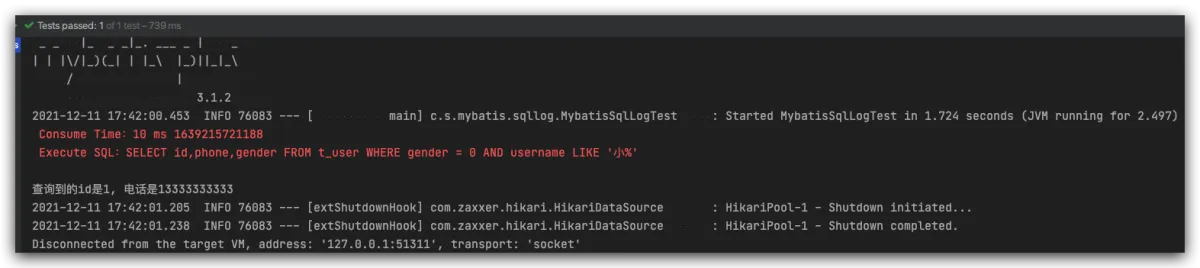
It looks pretty straightforward. But after skimming the source code, it seems there isn’t a built-in formatting config class. If you need formatting, you can implement your own by extending MessageFormattingStrategy and writing it similar to P6SpyLogger.
Afterword
For foundational components, when creating a project you usually pick a stable version to start with. After it goes to production and stabilizes, you typically lock the versions. I only noticed recently—when introducing MP into a new project—that the performance analysis plugin had been removed, so I’m writing this down as a reminder for anyone who also likes to enable SQL log output locally.
And yeah, using this for local debugging is genuinely awesome—just don’t turn it on in production.
All articles in this blog, unless otherwise stated, are licensed under @Oreoft . Please indicate the source when reprinting!