
Preface
TCP (Transmission Control Protocol), in Chinese called 传输控制协议, is a protocol in the Transport Layer of the OSI model and one of the core protocols of the Internet. Since TCP is connection-oriented and reliable, establishing a connection is much more complex than UDP. You often see public accounts writing about it nonstop, but most of it stays at an exam-oriented level. Today I want to talk about my own understanding of TCP’s three-way handshake.
TCP Characteristics
TCP has many characteristics, and they come from how it’s designed:
- TCP is connection-based: a connection must be established before data transmission. In other words, TCP can keep long-lived connections; it’s not an anonymous connection.
- Full-duplex: a bidirectional protocol—can send and receive.
- Byte-stream: compared to UDP, it doesn’t limit data size; data is packaged into segments for transmission and is ultimately ordered.
- Flow buffering: solves the mismatch in processing capability between the two communicating parties.
- Reliable transport service: delivery is guaranteed via ACKs; packet loss has a retransmission mechanism.
- Congestion control: prevents network congestion and optimizes transmission.
Based on the above characteristics, let’s talk about the three-way handshake.
Three-way Handshake
The three-way handshake means that when two TCP parties establish a connection, they need to exchange three packets to confirm the connection. To make it easier to understand, we’ll use “server” and “client” to represent the two sides.
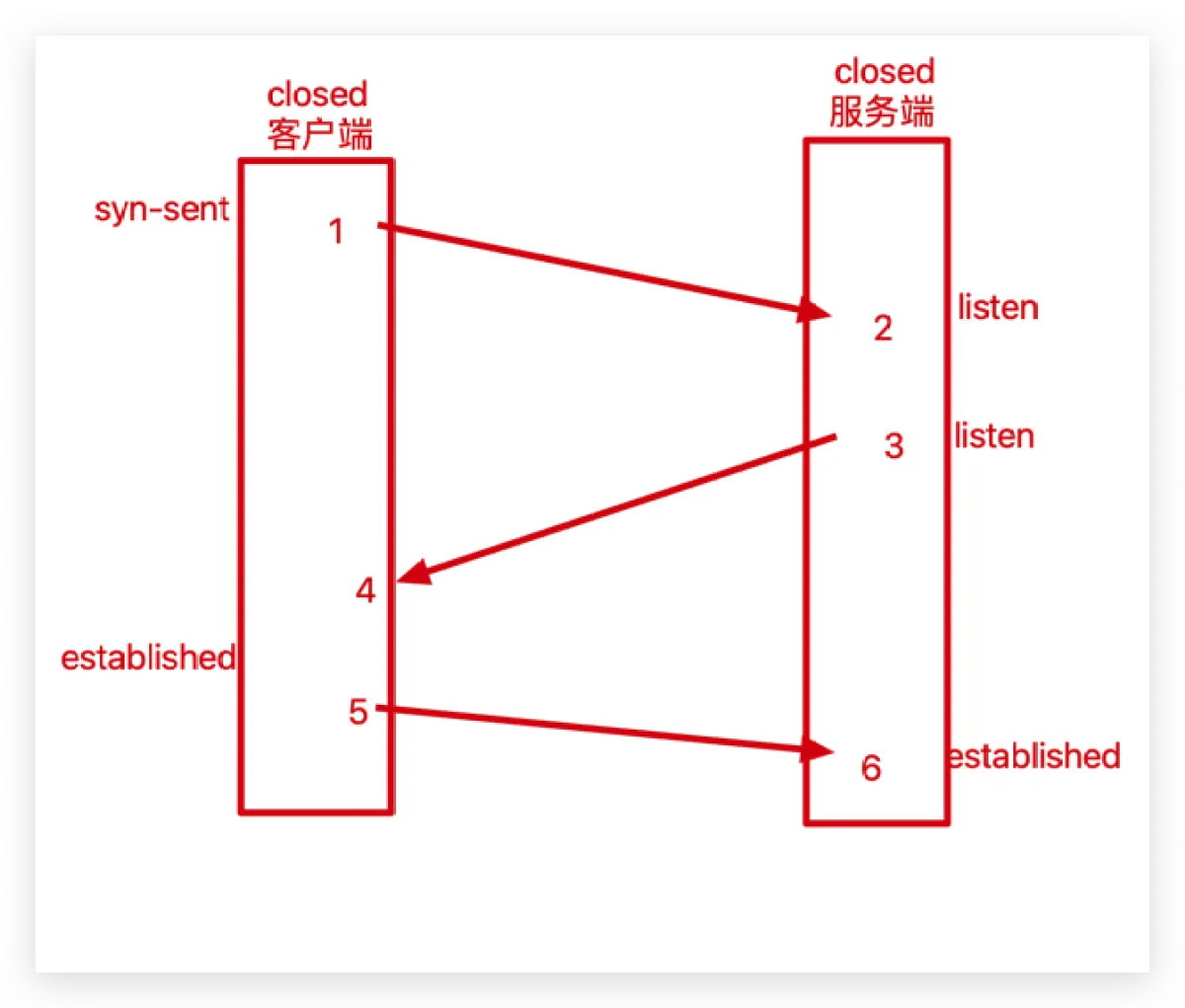
The real physical connection is TCP - Network Layer - Data Link Layer - Physical Layer. It’s drawn this way here just to make it easier to understand.
I’ll use 1-2, 3-4, and 5-6 to represent these three packet exchanges.
-
First, both the client and the server start in the CLOSED state.
-
Then the server starts listening on a port, and the client starts preparing to send the 1-2 message. Let’s take a look at the structure of a TCP packet:
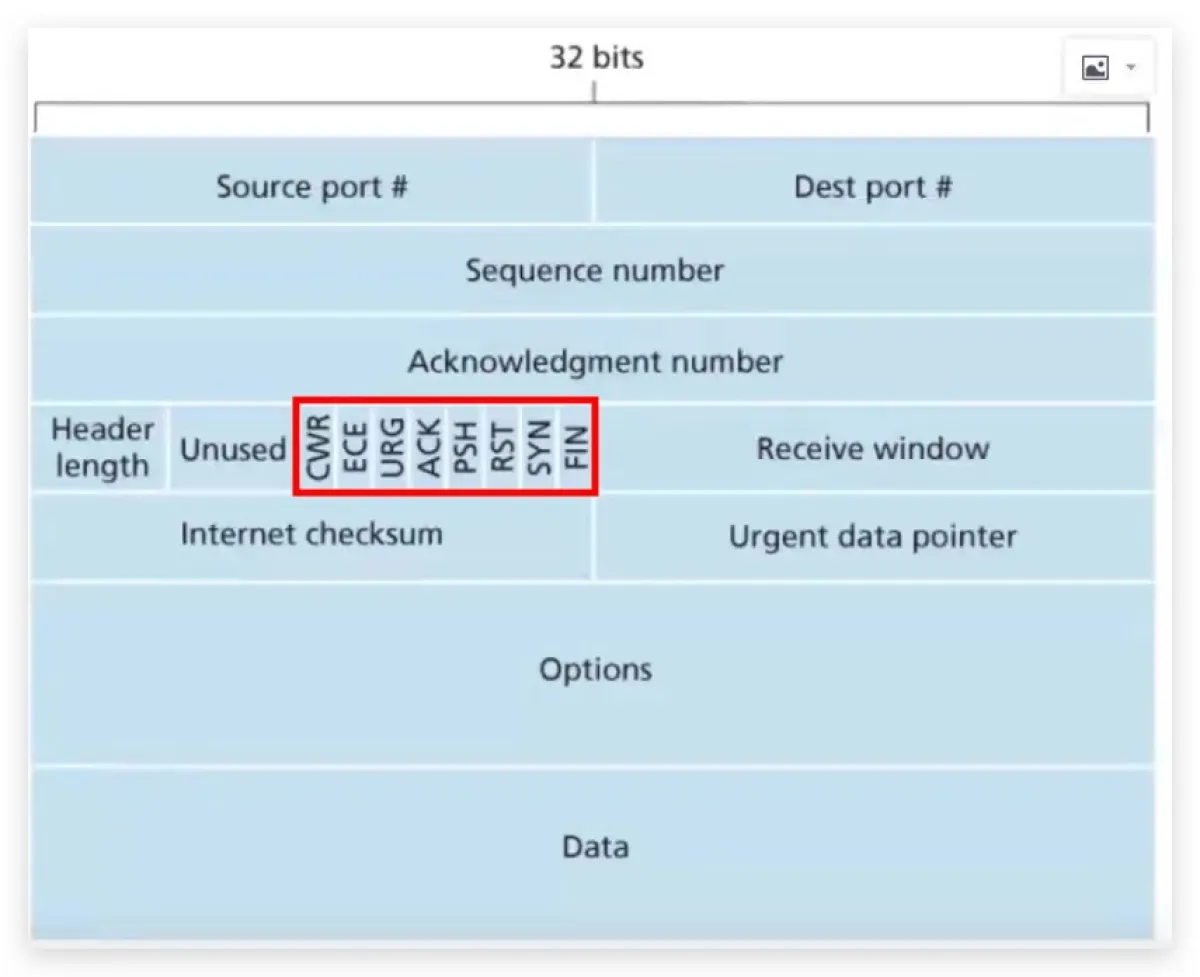
Starting from the first row: source port and destination port. The second row is the sequence number, represented here as seq. The third row is the acknowledgment number, represented here as ack (note this is lowercase ack). The last row is the payload, and the fourth row highlighted in red is the flag bits. Common flags: ACK indicates an acknowledgment (note this is uppercase ACK), SYN indicates sequence synchronization, and FIN indicates closing the connection.
More details are in the table below:
| Field | Meaning |
|---|---|
| URG | Indicates whether the data sent in this segment contains urgent data. When URG=1, it means there is urgent data. Only when URG=1 is the following Urgent Pointer field valid. |
| ACK | Indicates whether the Acknowledgment Number field is valid. When ACK=1, it is valid. Only when ACK=1 is the Acknowledgment Number field valid. TCP specifies that after the connection is established, ACK must be 1. (This is different from lowercase ack.) |
| PSH | Tells the other side whether to immediately push the data up to the application layer after receiving this segment. If the value is 1, it should deliver the data to the upper layer immediately instead of buffering it. |
| RST | Indicates whether to reset the connection. If RST=1, it means a serious error occurred in the TCP connection (e.g., host crash), the connection must be released, and then re-established. |
| SYN | Used when establishing a connection to synchronize sequence numbers. When SYN=1 and ACK=0, it indicates a connection request segment; when SYN=1 and ACK=1, it indicates the other side agrees to establish the connection. When SYN=1, it means this is a request to establish a connection or an agreement to establish a connection. SYN is 1 only in the first two handshakes. |
| FIN | Marks whether data has been fully sent. If FIN=1, it means data transmission is complete and the connection can be released. |
-
1-2 is sent: the client initializes the packet data structure, including source port, destination port, its window size, buffer, etc. It sends
SYN=1,ACK=0(this indicates a request segment), then randomly generates aseq(assume it’sx). At this point the client state becomesSYN-SENT. -
3-4 is sent: after the server receives the message, it also initializes its own packet data structure, then replies to that client with
SYN=1andACK=1(meaning it agrees to establish the connection). It randomly generates aseq(assume it’sy), and setsackto the client’sseq + 1(x + 1). Replying with uppercaseACKindicates this is an acknowledgment segment; replying with lowercaseackindicates the sequence number of the segment it expects to receive next. -
5-6 is sent: at this time, the client has already received the server’s ACK. In fact, the server has only received the client’s message so far, and doesn’t yet know whether the client can receive normally—i.e., whether the message it just sent was received by the client. So 5-6 is essentially the client replying with
ackto tell the server: I’ve received your message, my receiving capability is normal. It setsACK=1and setsackto the server’sseq + 1(y + 1), and at the same time sends a sequence numberseqequal to the previous sentseq + 1(x + 1). -
At this point, both sides know each other’s sending and receiving capabilities, and the connection can be established.
-
ps: To prevent a situation where one side fails and the other side waits forever, wasting resources, TCP has a keepalive timer. Every time a message is received, this timer is reset. If no messages are received for a long time, it will send a probe segment. If there is no ACK reply for ten consecutive probes, it will close the connection.
Viewing TCP Connection Segment Information
Just talking about it is honestly kind of dry, not as “readable” as those public-account articles. We can capture TCP packets via the terminal and inspect the segments exchanged during connection establishment. The commands you’ll need are:
// tcpdump命令 是一款抓包,嗅探器工具
tcpdump -i 网卡 -S -c 3 port 5555
// 其中-表示指定网卡,-c 表示接收到多少次以后就停止监听 port表示监听的端口

// nc命可以通过 TCP 和 UDP 在网络中读写数据
nc 对方ip 端口
-
First, find your network interface card (NIC).

-
Set up the server to listen.

-
Open the client, then enter the server’s port and use
ncto establish a connection.
- We can see the
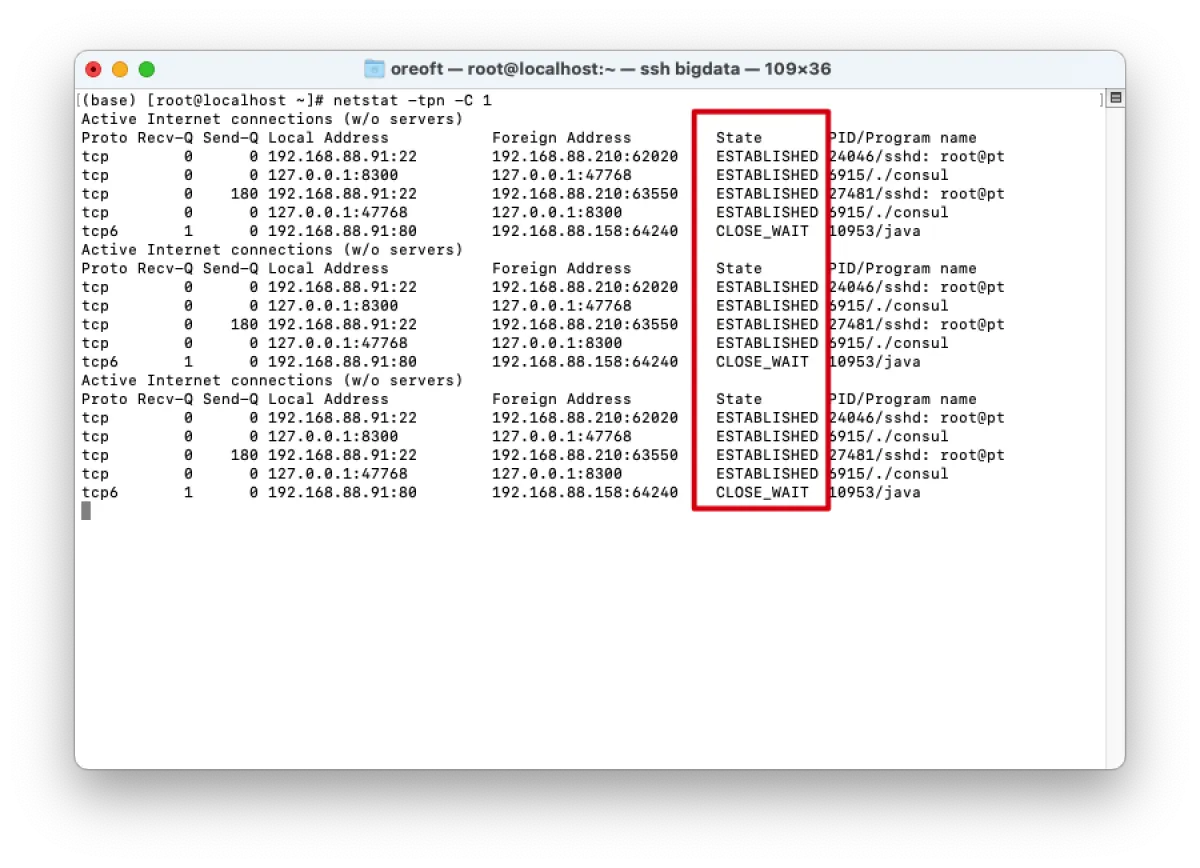
seqvalues—each time it’s+1—and also someackinformation. - We can also use the following command to look at some TCP connections established by the system:
// 查看Linux中网络系统状态信息,t是筛选tcp,p是显示端口,n是数字显示,C是刷新时间
netstat -tpn -C 1
All articles in this blog, unless otherwise stated, are licensed under @Oreoft . Please indicate the source when reprinting!